Bookings · Day 3 · Live
How to turn cleaning enquiries into confirmed bookings without re-entering the same job
Keep the customer, scope, agreed price, date, cleaner and payment state in one booking record. Check the facts before confirming anything, and let the owner control every commitment.
The owner’s problem: one job is spread across four places
The address is in WhatsApp, the date is in a calendar, the price is in a text message and the cleaner receives a screenshot. Every copy-and-paste creates another chance to miss a room, use an old price or send someone at the wrong time. The fix starts before software: decide which facts must be complete before an enquiry becomes a confirmed job.
What must be checked before you confirm a cleaning booking?
Use one short gate for every channel. An enquiry is not a booking until the owner has checked the customer, place, work, price and schedule.
How the live EcoBroom AI booking workflow works
This evidence map reflects the current booking workspace. It uses the fictional Willow & Shine Cleaning Ltd and fictional reference WS-1042. A request can start through the customer booking form, from an accepted quote or as a booking entered by the owner.
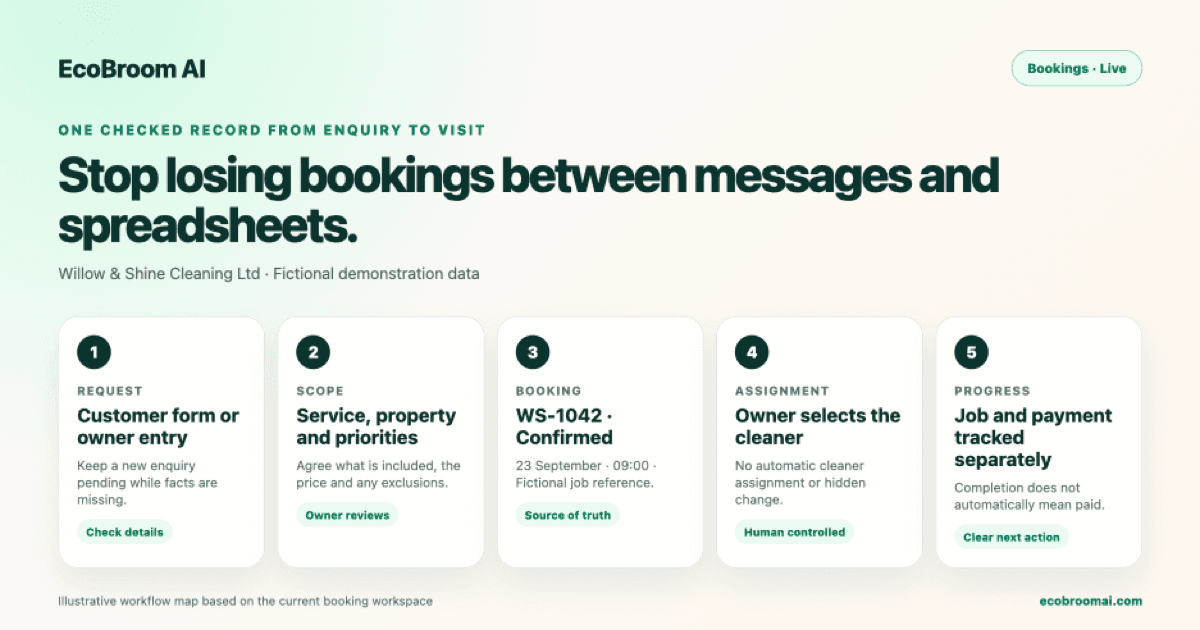
- 1Collect the request through the customer form, or add an agreed phone, email or WhatsApp enquiry manually.
- 2Review the customer, address, service, scope, price, date, time and notes.
- 3Keep the job pending while a material detail is still unknown; confirm it only after the agreement is clear.
- 4Select the cleaner in the booking workspace. EcoBroom AI does not assign a cleaner automatically.
- 5Track job status and payment status separately, because completed does not always mean paid.
- 6Keep the booking record as the source of truth for schedule, assignment, notes, payment and later quality evidence.
Automation stops before the business makes a promise
The owner decides whether the scope is complete, the price is right, the cleaner is suitable and the time is available. Turning a WhatsApp conversation into a booking draft is Coming soon; today, the owner creates the booking from the agreed details. Nothing should be booked from an unfinished chat, and no cleaner should be assigned without an owner’s choice or approval.
How should recurring cleaning work be carried forward?
A live recurring plan can carry the agreed visit pattern forward while each visit keeps its own operational record.
- Choose the weekly, fortnightly, three-weekly or four-weekly pattern.
- Set the preferred time and negotiated price per visit.
- Choose the recurring crew and checklist; future visits inherit them.
- Review each visit separately for status, payment, hours, notes and quality evidence.
Questions cleaning-business owners ask
Does every enquiry become a booking automatically?
No. The owner checks the details and creates or confirms the booking.
Can WhatsApp chats create booking drafts today?
Not yet. That workflow is Coming soon; enter the agreed details manually today.
Does EcoBroom AI choose the cleaner?
No. The owner selects the cleaner, or reviews and approves a proposed assignment in Mia.
Should job status and payment status match?
Not always. A completed job may still be unpaid, and a paid booking is not automatically completed.
What if the date or scope is still unclear?
Keep the request pending and confirm the missing fact with the customer before scheduling it.