Prove every clean with before-and-after photos.
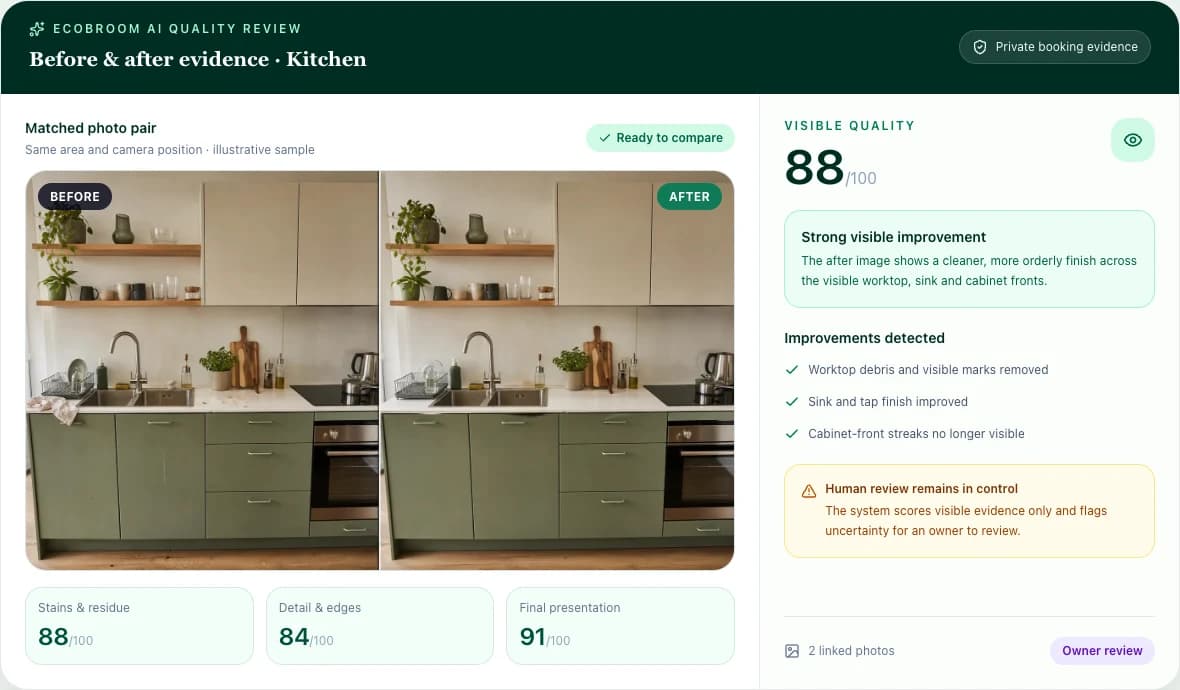
Photograph each area before and after. EcoBroom AI checks every spot on the area's checklist twice, scores the visible result and flags what it can't see. You review it, then send the customer a short report with your name on it.
How it works
From two photos to a report your customer trusts.
A complaint used to be your word against theirs. Now every job can carry its own evidence, checked the same way every time.
Pick the area
Choose from twelve areas. Each one opens a photo guide listing exactly what to get in the frame.
Take before and after
Match the after shot to the before. The guide suggests a close-up of the spots where dirt usually hides.
Every spot checked twice
The AI judges each spot on the checklist, twice. The score comes from those results by fixed rules.
You review, then share
Dismiss anything that isn't right, choose what the customer sees, and send the report link.
Photo guides
The checklist is the photo guide.
Each area has its own list of spots. It tells whoever holds the camera what to get in the frame, and it is exactly what the AI is asked to judge — so the photo always shows what the check needs.
- Kitchen
- Bathroom
- Living room
- Bedroom
- Oven
- Microwave
- Fridge or freezer
- Toilet
- Windows
- Corners and edges
- Hallway
- Something else
Kitchen · what to get in the frame
- HobBurners, knobs and the glass or steel top
- Sink and tapLimescale gathers around the tap base and plug
- WorktopsFull length, including the ends by the wall
- Cupboard and appliance frontsHandles, door edges, oven glass
- SplashbackBehind the hob and the sink
- FloorThe edges and in front of the units
How the score works
A score you can explain to a customer.
Scored by rules, not a guess
The AI reports each spot's condition. The number is worked out from those results the same way every time.
Disagreement is flagged
Each area is checked twice. If the two checks disagree, the spot is marked unsure instead of guessed.
Only what the photo shows
Anything the camera couldn't see is listed as a limitation, not scored as clean.
A missed spot counts
One missed spot caps that area at 49, however good the rest looks.
The customer report
Send proof, not a promise.
When you are happy with the review, share a link. The customer opens a clean, branded page — nothing reaches them until you send it.
Your brand, your report
Your company name and logo, the areas cleaned, and before-and-after photos side by side.
You choose what it shows
Show or hide the score, what is still open, and the cleaner's name, per report.
Print or save as PDF
The customer can print the report or keep it as a PDF, and email you from it.
Switch the link off
Turn sharing off and the report link stops working straight away.
Questions
What owners ask first.
Does the AI decide whether the clean passed?
No. It checks the photos against the area's checklist and scores what it can see. You review every result, dismiss anything that isn't right, and decide what the customer sees.
What if a photo is unclear or misses part of the room?
What the camera couldn't see is listed as a limitation rather than counted as clean, and a spot the two checks disagree on is marked unsure for you to look at.
Do I need a booking to run a review?
No. Start a review for any job, whether or not it is booked in EcoBroom, and it appears with your other jobs.
Can I try it before I sign up?
Yes. The free demo runs a review on your own before-and-after photos with no account and no card, and it does not keep the photos.
Who can see the photos?
In your workspace, reviews and their photos are private to your company. A customer sees only the report you share, and only while its link is switched on.
Which areas can it check?
Kitchen, bathroom, living room, bedroom, oven, microwave, fridge or freezer, toilet, windows, corners and edges, hallway, or anything else you name.
Owner pilot · 30 days
Check your next clean before the customer does.
Try the demo on your own photos, or start the 30-day trial and run quality reviews next to your bookings, team, WhatsApp, finance and Mia.