Quality · Day 2 · Live
Before-and-after cleaning photos: a quality-control workflow that protects owners and cleaners
Random photos rarely settle a cleaning dispute. A fair record uses the same area, a similar angle and useful light, checks only what is visible, and leaves the final decision with the owner.
The owner’s problem: a complaint arrives, but the evidence is scattered
A customer says the kitchen was not finished properly. The owner was not there, the cleaner remembers it differently, and the only pictures are mixed into a message thread. Without a fair pair of images and a clear checklist, paying for a re-clean or rejecting the complaint becomes a guess. That is unfair to the customer, the cleaner and the business.
What makes before-and-after evidence fair?
A useful comparison is repeatable. It should help another person see what changed without relying on a carefully chosen angle or a score they cannot explain.
- Photograph the same room or named area before and after the work.
- Stand in roughly the same place and use a similar angle and distance.
- Use enough light to show surfaces clearly; do not hide a weak result in shadow.
- Include the whole checklist area, then add a close-up only when a detail needs it.
- Keep the images with the booking or review instead of scattering them across chats.
- Record anything the camera cannot show, such as smell, touch, hidden surfaces or access limits.
How the live EcoBroom AI quality-review workflow works
EcoBroom AI’s quality review is Live. The example below uses synthetic property imagery and the explicitly fictional Willow & Shine Cleaning Ltd workspace. No real home, customer or cleaner data is shown.
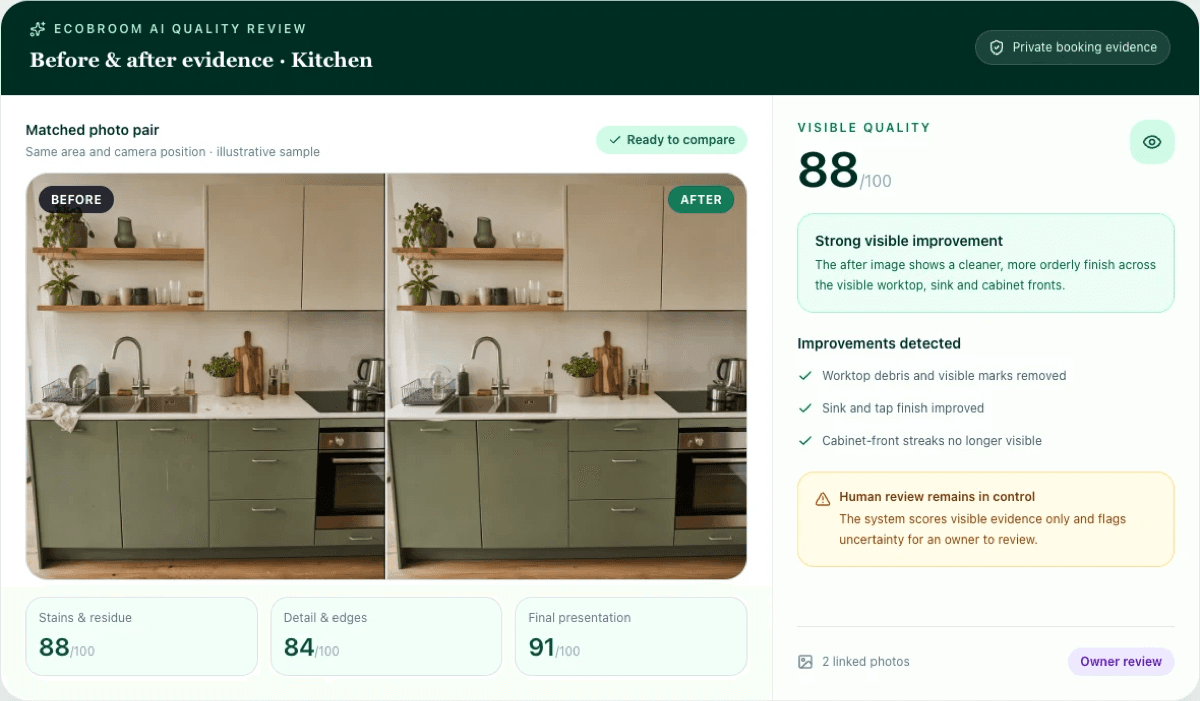
- 1Open a completed booking waiting for review, or start a one-off quality review.
- 2Choose the area and read its photo checklist before taking the first image.
- 3Take the after photo from a similar position, distance and angle.
- 4Let the system compare only the visible checklist spots. Each area is checked twice, and disagreement is flagged as uncertain instead of guessed.
- 5Read the findings, limitations and any request for a better photo. Arrange a fix or retake where the evidence is weak.
- 6The owner reviews every finding, dismisses anything that is not right and approves the result.
- 7Only then choose what appears in the customer report. The report link can be switched off later.
The AI checks visible evidence; the owner controls the decision
A score is not a verdict. The system can compare visible checklist spots and flag uncertainty, but it cannot smell a room, feel a surface, see behind an object or know what happened outside the frame. The owner decides whether the evidence is good enough, whether a cleaner should return and whether a customer report should be shared.
Cleaner photo checklist
When should an owner contact the cleaner or customer?
Use the photos to guide a conversation, not to replace one. Pause the decision when the evidence does not match the claim or when the issue cannot be judged visually.
- The before and after images show different rooms, angles or distances.
- A key checklist spot is hidden, blurred, too dark or outside the frame.
- The customer’s concern is about smell, damage, access or something a photo cannot prove.
- The cleaner says the brief changed, an area was inaccessible or another person altered the room.
- A proposed re-clean, refund or complaint response needs context beyond the visible evidence.
Questions cleaning-business owners ask
Do before-and-after photos prove that every part of a room is clean?
No. They record only what is visible in the frame. Hidden, unclear or unphotographed areas must be treated as limitations.
Does EcoBroom AI automatically decide that a clean passed?
No. It checks visible evidence against the area checklist. The owner reviews the findings, dismisses anything incorrect and decides whether to approve the result.
What if the two photos do not match?
Take a better after photo when possible. A different angle, distance or light can make the comparison unfair.
Can the customer see every internal photo and note?
No. The owner chooses what appears in the customer report and decides whether to share its link. The link can later be disabled.
Should I promise a re-clean based only on the score?
No. Read the visible findings and limitations, speak to the cleaner or customer when context is missing, and make the business decision yourself.