Quoting · Day 1
How to quote a cleaning job from property details, priority areas and photos
A reliable cleaning quote does not come from photos alone. Combine the customer’s service request, property details, rooms, areas needing attention and clear supporting photos—then let the owner review the AI estimate before it is sent.
The short answer
A reliable cleaning quote does not come from photos alone. Combine the customer’s service request, property details, rooms, areas needing attention and clear supporting photos—then let the owner review the AI estimate before it is sent.
What information makes a quote defensible?
A photograph shows the condition of the area inside the frame. It does not reliably show the full size of the property, every room, access restrictions or the customer’s expectations. Start with the job facts and use photos as supporting evidence.
- The cleaning service requested: regular, deep, end-of-tenancy or a defined room-only job.
- Property type and real room counts, including separate WCs, receptions and kitchens.
- The areas needing focus, such as an oven, heavy limescale, grease, internal glass or carpet work.
- Clear photos of those areas, when available, plus the business’s own hourly or base rate.
- Inclusions, exclusions, access notes and anything that must be confirmed on site.
What should the photos show?
Ask for wide room views and close-ups of the problem areas. Good light and clear angles help. Photos are optional in EcoBroom AI: a clear customer message can start the quote, while photos add condition evidence. A room that was not photographed must not silently disappear from the scope.
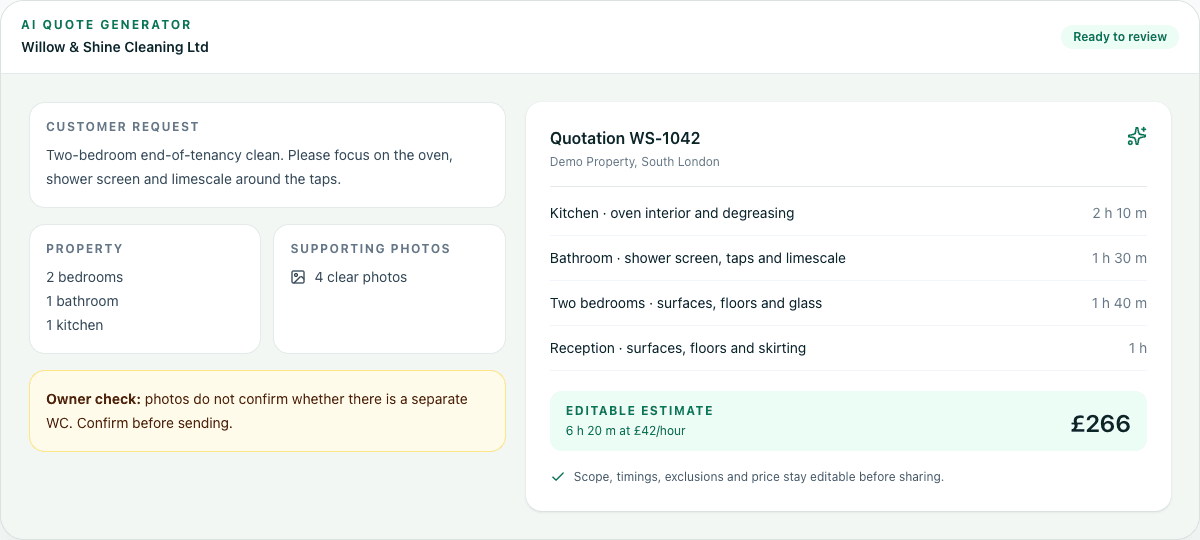
How EcoBroom AI builds the quote
- 1Paste the customer’s message and choose the service.
- 2Confirm whether the request covers the whole property or only named rooms.
- 3Enter or correct the property type and room counts.
- 4Add up to five useful photos of the areas that affect the work.
- 5Enter the company’s real rate and generate the itemised estimate.
- 6Review the room-by-room time, inclusions, exclusions, warning notes and final price.
- 7Edit anything the AI could not know, then download the PDF or share a summary.
What AI can suggest—and what the owner must decide
EcoBroom AI can organise the request, read visible condition, propose scope and estimate time. It cannot see a missing room, know an access problem that was never supplied, or decide the margin your business needs. The owner remains responsible for confirming the scope and price. If important information is missing, ask the customer or confirm on site.
Is this enquiry ready to quote?
Questions cleaning-business owners ask
Can I quote without photos?
Yes. A clear written request can start the estimate. Photos help show condition but are not a substitute for property facts.
What if the customer sends only one room?
Treat it as incomplete unless they confirm the job covers only that room. Ask for the missing details before sending a whole-property price.
Does the AI send the quote automatically?
No. The owner reviews and edits the scope, time and price before downloading or sharing it.
Is the estimate a guaranteed final price?
Not when essential information is missing. State the assumptions and confirm on site when the job cannot be assessed remotely.