Cleaners · Day 4 · Live
Cleaner scheduling without group-chat confusion: assignment, hours and pay in one workflow
Give the cleaner the current job context, let the owner choose the crew, record actual hours, and keep calculated gross pay and pay status connected to the same assignment.
The owner’s problem: the cleaner has a date, but not the current job
A cleaner sees Tuesday in a chat but misses the access note. A changed crew is buried under later messages. After the visit, the owner reconstructs time and pay from screenshots. The rota may look full, but nobody can prove which instructions were current. A reliable handoff needs more than a name beside a date: it needs one checked job record and a clear owner decision.
What should be checked before a cleaning job is handed over?
Use this short handoff check even if you do not use EcoBroom AI. The cleaner should be able to understand the work without searching a group chat, and the owner should be able to see who accepted the assignment.
How the Live EcoBroom AI cleaner workflow works
This evidence map is based on the current production booking, calendar, employee and recurring-plan workflow. It uses Willow & Shine Cleaning Ltd, Demo Cleaner A, Demo Property and WS-1042—all explicitly fictional demonstration data.
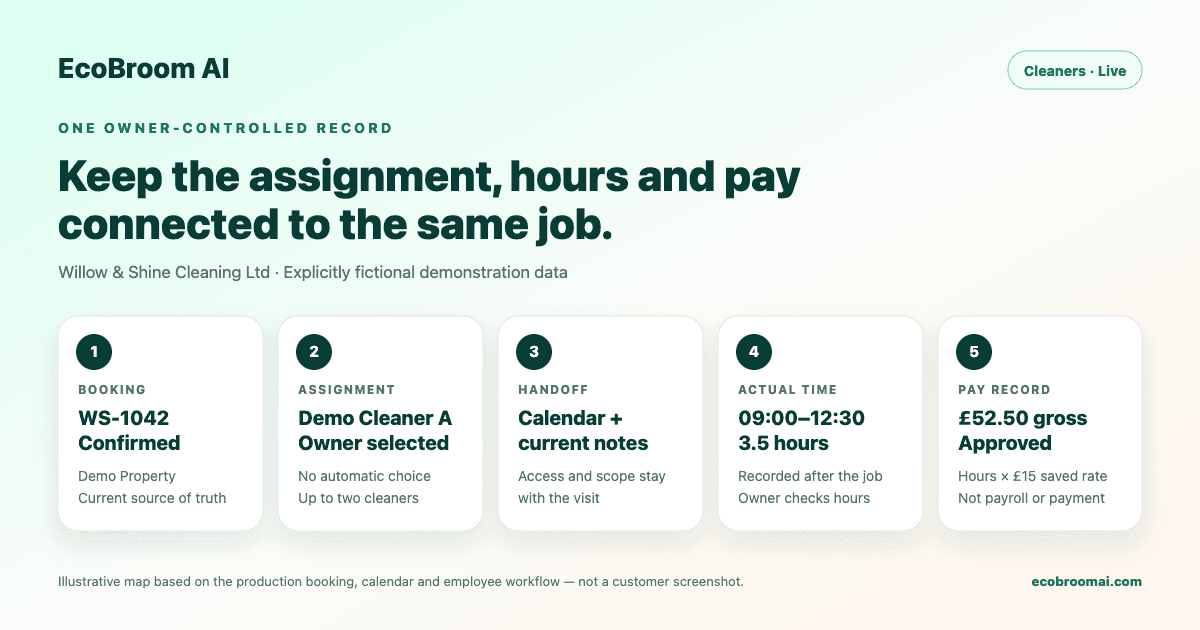
- 1The owner reviews the confirmed booking, including the service, schedule, field notes and access context.
- 2The owner selects up to two active cleaners and saves the assignment status and cleaner-facing notes. EcoBroom AI does not assign cleaners automatically.
- 3The assignment appears with the booking in the week calendar and in each cleaner’s job history.
- 4After the visit, the owner records time in and time out, or checks the actual hours in the cleaner record.
- 5The workspace calculates gross pay from actual hours multiplied by the saved job rate; the owner checks the hours, rate and result.
- 6The owner records pay as unpaid, approved, paid or void and can add a reference. The record then contributes to employee and finance summaries.
The owner controls assignment and money records
EcoBroom AI stores the selected crew, notes, time and calculated gross-pay record. It does not decide who is suitable, confirm that someone is available, send wages, run PAYE, calculate tax or National Insurance, manage pensions, or replace payroll and accounting records. The owner must verify the latest instructions, actual hours, agreed rate and real payment before changing a status.
How recurring work and preferred language reduce repeated admin
A Live recurring plan can carry a chosen crew and checklist into future visits. Each visit still needs its own review. A cleaner’s preferred language can also be saved, but that preference does not guarantee that every free-text note or conversation has been translated correctly.
- Choose the recurring crew and checklist once, then review each generated visit.
- Keep the latest access or scope change on the visit, not only in a message thread.
- Use the saved preferred language to support a clearer workspace experience.
- Ask the cleaner to confirm safety-critical, access or changed-scope instructions directly.
Questions cleaning-business owners ask
Does EcoBroom AI choose the cleaner automatically?
No. The owner selects the crew or reviews and approves a proposed assignment.
Can one booking have more than one cleaner?
Yes. The current workspace lets the owner select up to two cleaners, with separate hours and pay records.
Does calculated gross pay mean the cleaner has been paid?
No. It is an operational calculation. The owner must record and reconcile the real payment separately.
Is this payroll or accounting software?
No. It does not run PAYE, tax, National Insurance, pensions or statutory filings.
Do recurring visits need another check?
Yes. Future visits can inherit crew and checklist details, but the owner should review availability, changes and each visit’s actual record.